
TicketBoxPH: event ticketing built around the door
A project story about building an event ticketing platform for the Philippines, from event pages and GCash checkout to QR tickets, a phone scanner, and a payout ledger.
- Events
- ticketing
- payments
- Philippines
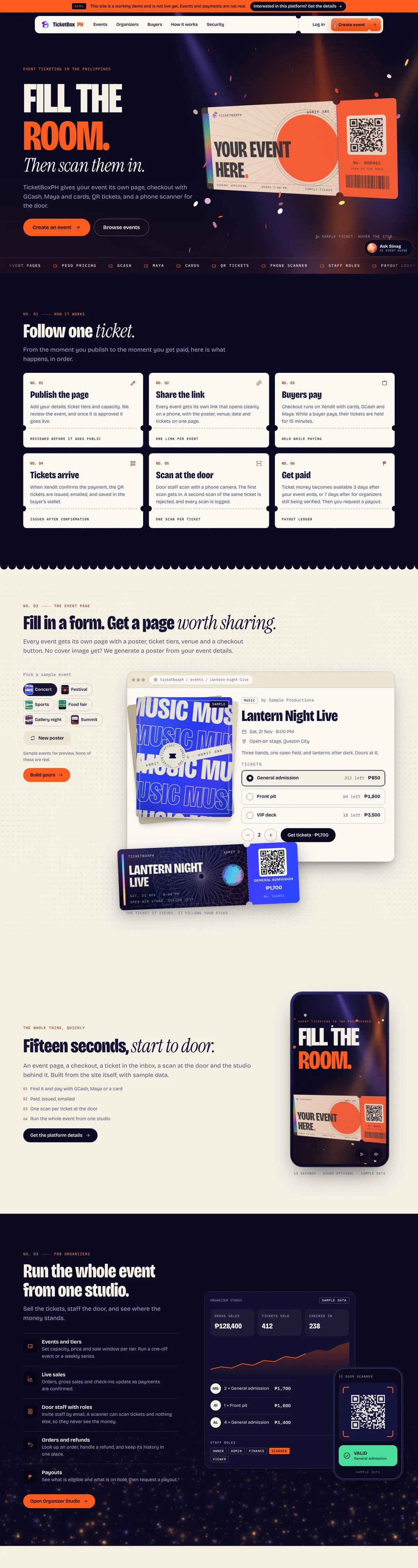

Hover the browser to scroll the live page capture.
- Project
- TicketBoxPH
- Type
- Client website
- Sector
- Event ticketing
- What we built
- Event pages with GCash, Maya, and card checkout
- QR tickets, a phone scanner, and staff roles at the door
- A payout ledger for organizers, shown as a working demo
- Live site
- ticketbox.vibeboxph.com
Ticketing products are judged at two moments: when a buyer pays, and when a ticket is scanned at the door. TicketBoxPH was designed around both. The brief was an event ticketing platform for the Philippines where an organizer can publish a page, sell tickets with GCash, Maya, and cards, scan QR entries from a phone, and get paid after the show.
The public site is a working demo. It says so in a banner at the top of every page: events and payments are not real yet. That honesty shaped the work, because a demo has to explain a real product without pretending to be one.
The product problem
Event sales in the Philippines often run through social posts, chat threads, and a spreadsheet at the entrance. A ticketing platform has to replace all three without adding friction for either side:
- buyers need a page that opens cleanly on a phone and a checkout that accepts the methods they already use;
- door staff need a fast scan with a clear valid or rejected answer;
- organizers need to see sales, staff, refunds, and payouts in one place;
- the platform needs to review events before they go public.
The design challenge was to make a transaction-heavy product feel like a night out, not a back office.
Following one ticket
The homepage explains the product as one ticket's journey in six numbered steps: publish the page, share the link, buyers pay, tickets arrive, scan at the door, get paid. Each step carries one plain rule instead of a feature list: events are reviewed before they go public, tickets are held for 15 minutes while a buyer pays, a second scan of the same ticket is rejected, and ticket money becomes available a fixed number of days after the event ends.
Showing the product instead of describing it
A live event-page builder lets a visitor pick a sample event, such as a concert, festival, or gallery night, and see the page and the ticket it would produce. Samples are labeled as samples. A generated poster covers organizers who have no cover image yet.
Organizer studio and the door
The organizer section shows sample sales, tiers, check-in counts, and staff roles, with a door-scanner view that returns a valid or rejected state. Staff can be invited by email with limited roles so they can scan tickets without seeing the money. Orders, refunds, and payouts sit in a ledger the organizer can read.
A product surface, not only a landing page
Beyond the hero, the site carries events, organizer and buyer pages, how it works, a security page, login, and event creation. A guide assistant, Sinag, answers event and ticketing questions in the corner of the page.
The visual language is dark and high-contrast, with a ticket-stub motif running through the type, the cards, and the motion. It stays fast on a phone, and motion respects the reduced-motion setting.
What the work reinforced
- Label the demo. Sample events and a clear banner build more trust than invented sales numbers.
- Design for the scan. The door is where the product succeeds or fails, so it gets its own screen and its own rules.
- Put the money rules in plain sight. Hold times, payout timing, and refund behavior are product features. Say them on the page.
Continuing work
TicketBoxPH is a working demonstration of a full ticketing surface rather than a launched marketplace. This story will be updated as events and payments open to real organizers. If you are building a ticketing or booking product of your own, the useful takeaway is simple: design the door and the payout first, then let the marketing page explain what already works.
Keep reading
A project story about building a specialty coffee and coworking website for two Metro Manila locations, with a menu, workspace rates, and Kopi, an AI companion.
Project story · 5 min readReact Component Kit: headless components styled with TailwindA project story about building a public, source-delivered React component registry with accessible headless primitives, Tailwind styling, and shadcn-compatible install paths.
Start a project
Planning a website of your own?
Tell us what the website needs to accomplish. We reply with an honest fit review and the right next step.